Crowd Collapse
- 4.6
- Rating
- 100.00K
- Installs
- Free
- Price

 Analysis by App-foxy
I approached Crowd Collapse as the kind of arcade game I could pick up without preparation, play for a short while, and put down again. Its central idea is easy to understand: line up a shot and see how many people you can take down with one move. That simplicity is the main attraction, but it also means the quality of each session depends heavily on how clearly the game communicates what is happening and how comfortable the controls feel.
Developed by Yso Corp, this free game is aimed at Everyone and runs on Android devices using version 8.0 or later. It sits in the casual arcade space rather than trying to be a deep strategy experience. I would recommend it to someone who enjoys quick physics-style challenges and immediate feedback, especially when they want something that does not require a long tutorial or a large time commitment.
The game has reached over 100 thousand installs and holds a 4.6 average from more than 300 ratings. Those figures suggest that its straightforward premise has found an audience, although they do not change my main advice: try it with your own device and playing habits in mind, because accessibility here is shaped more by the moment-to-moment interaction than by the broad concept.
You May Also Like

 Blood Strike: 2.5 Anniversary
Blood Strike’s Loadouts Turn Every Drop Into a Tactical Gamble
A close look at Blood Strike’s custom loadouts: how fast access to signature weapons reshapes its battle royale rhythm, rewards preparation, and narrows the gap between fights.

 Pandora - Music & Podcasts
Pandora’s Music Is Easy to Start, but Harder to Recover
Pandora’s strength is its low-effort path from a seed to a station. Its weak spot is how much confidence it asks you to place in connection, setup, and quiet recovery.

 8 Ball Pool
 Is Built on Rivalries, Rematches, and Routine
A close look at the rivalries, rematches, shared routines, and unanswered safety questions that turn a quick pool match into a persistent mobile community.

 Samsung Music
’s Quiet Strength Is Playing What You Already Own
Its reach comes less from spectacle than from dependable access to a personal library. That simplicity is both the app’s strongest retention engine and its ceiling.

 AccuWeather: Weather Radar
AccuWeather Review: A Quick, Clear Forecast for Everyday Decisions
For everyday plans, the best forecast is the one you can understand quickly. AccuWeather makes rain timing, radar, and local conditions easy to act on, with a few trade-offs.

 Hill Climb Racing
Why Hill Climb Racing Still Turns Crashes Into One More Run
A tiny car, a bumpy hill and one more upgrade: Hill Climb Racing keeps resurfacing because its simple chaos makes every near-miss feel personal.
More From Our News Desk
View All News


How Crowd Collapse works in everyday play
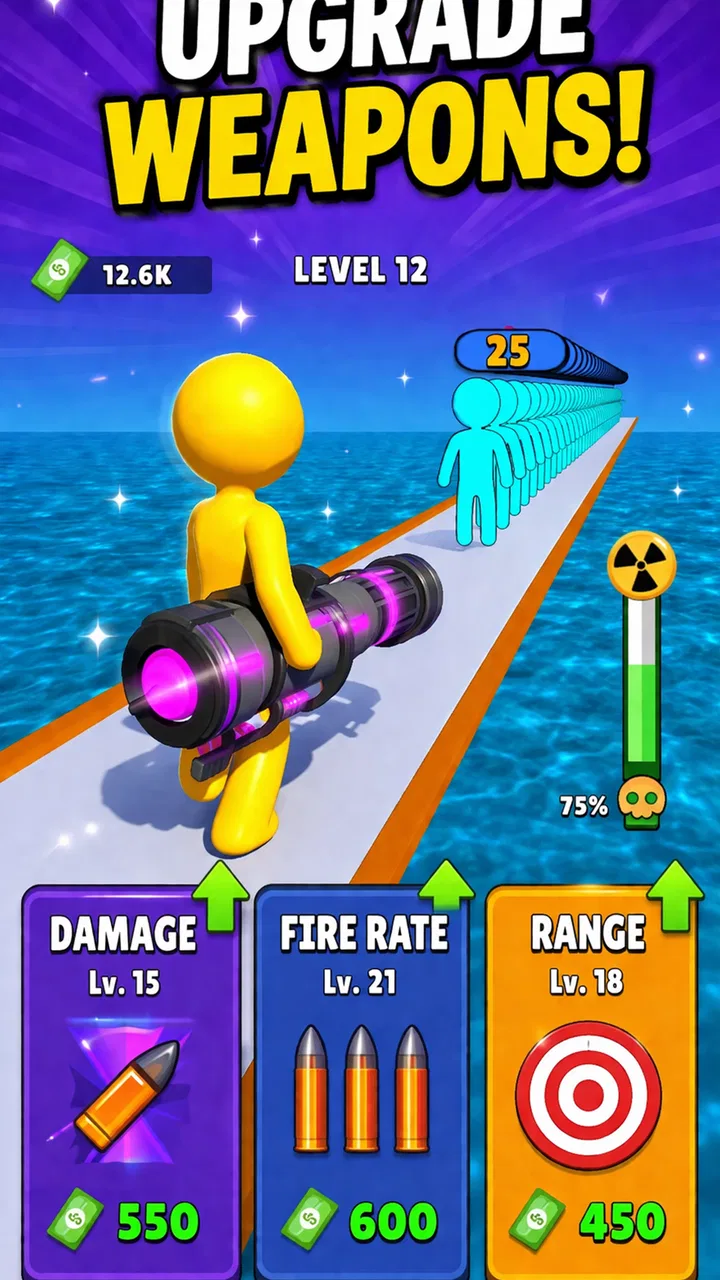
I focus here on the part of Crowd Collapse that most shapes the experience: making one shot count. I’ll look at how that simple aim-and-release idea feels during an ordinary session, including a practical way to approach each scene, before weighing where its directness helps and where it can become limiting.
Readability and navigation come first
The strongest accessibility feature is the basic visual clarity of the objective. I do not need to understand a complicated menu system before starting. The whole appeal is built around reading a scene, choosing a target, and making one shot count. That makes the game approachable for people who prefer direct interactions instead of layered menus, inventories, character statistics, or long streams of text.
For a new player, the useful question is not “What does every button do?” but “Where should I aim, and what result might this create?” That narrow decision keeps the mental load low. It also makes the game suitable for short breaks, such as waiting for an appointment or taking a few minutes away from work. I can return to the basic challenge without remembering a complicated story or a chain of objectives.
There is a trade-off, though. A simple interface is not automatically a highly readable interface. The game depends on seeing the play area, identifying the crowd, and judging the path of a shot. Players with reduced vision may find that the important information is concentrated in small moving figures and environmental details. If the scene becomes visually busy, the difference between a useful target and background decoration may be harder to notice.
I would therefore begin with the phone held at a comfortable distance and with the screen free from glare. This sounds obvious, but it matters more in a game where one visual decision can determine the entire result. A larger display may be more comfortable than a compact phone because it gives the target area more room, even though the game itself remains easy to understand on a smaller screen.
Navigation is also easier when I treat each attempt as a self-contained puzzle rather than rushing through it. Before touching the control, I take a moment to scan the whole scene. That small pause helps me distinguish the intended target from distractions and reduces the need for rapid visual switching. It is a practical way to make the game calmer without changing any settings.
Motor demands are simple, but precision still matters
The control concept is uncomplicated: I guide a shot and release it. That is less demanding than a game requiring several buttons, rapid combinations, or constant character movement. Someone who struggles with remembering complex control layouts may appreciate having one main action to focus on.
Still, “one action” does not mean “no motor challenge.” Accuracy depends on controlled finger movement and timing. Players with tremors, limited reach, joint pain, or difficulty maintaining a steady touch may find aiming frustrating, particularly when a small adjustment changes the outcome. The game’s accessibility is strongest for people who can perform deliberate touchscreen gestures, not necessarily for every player who prefers simple controls.
My practical approach is to use the hand that gives me the steadiest movement and to avoid gripping the phone too tightly. Resting the device on a table can help when precision matters, although that is less convenient when playing while standing or traveling. A stylus might improve control for some people, but I would treat that as a personal experiment rather than a guaranteed solution.
Another useful habit is to separate observation from movement. I look at the scene first, place my finger only when I have a plan, and make one measured gesture instead of repeatedly correcting it. This reduces accidental touches and makes the game feel less frantic. It also helps players who need a little more time to coordinate what they see with what they want their hand to do.
The sensory side is more mixed. The visual impact of a successful shot is central to the satisfaction of the game, so players who are sensitive to motion, sudden changes, or crowded scenes may want to take regular breaks. I would not choose this as my first recommendation for someone who specifically needs a very quiet, low-stimulation game. A slower puzzle with static boards would probably be a better fit in that situation.
Why the game suits short, flexible sessions
One of the most useful qualities is that I can play without committing to a long session. That matters for people with unpredictable schedules, limited concentration, or fatigue that makes extended gaming uncomfortable. A quick arcade attempt can fit into a short pause without demanding that I remember a large amount of information when I return.
A realistic example is playing during a commute while seated, with the phone held securely and the sound kept low or muted if needed. The game’s basic premise is understandable even when I am not in the mood for dialogue or detailed instructions. However, I would avoid playing while walking, crossing a street, or handling anything that requires attention. The need to aim carefully makes it unsuitable for situations where the device cannot be the main focus.
It can also work well as a low-pressure introduction to mobile games. Someone who feels overwhelmed by role-playing systems or competitive multiplayer may find the single-shot challenge easier to approach. Parents or families looking for an Everyone-rated title may appreciate the broad age rating, while still supervising younger players around optional purchases.
The free entry point is helpful because I can test the controls before deciding whether the format suits me. The game includes in-app purchases ranging from $3.49 to $99.99 per item, so I would recommend checking purchase controls before handing the device to a child or to anyone who may tap through prompts impulsively. The game can be tried without paying, but the presence of optional spending is still part of the practical decision.
Where different abilities may change the experience
For players with hearing loss, the game may be easier to approach than an audio-led title because the central action is visible. I can understand the basic goal from the scene itself rather than relying on spoken instructions. That said, I would not assume that every piece of feedback is available visually in the same way, so playing with sound reduced or disabled may change how satisfying the response feels.
For players with limited vision, the main challenge is not learning the rules but seeing the relevant details. I would try increasing the device’s general display size or contrast settings if the phone supports them, and I would test whether the game remains comfortable without forcing the eyes to track tiny figures. These are device-level adjustments, not guarantees that every element will enlarge, but they are sensible first steps.
Players with cognitive disabilities may benefit from the narrow objective and repeated structure. There is less need to manage several simultaneous systems, and each attempt gives a clear opportunity to reassess. On the other hand, repeated failure can become tiring if the game does not provide enough variety or if the visual result is difficult to interpret. I would use short sessions and stop before frustration turns the game into a chore.
For people with attention difficulties, the immediate goal can be a strength. There is always a concrete action to consider. The weakness is that quick visual scenes can also compete for attention. A quiet environment, a stable seat, and a deliberate “look first, aim second” routine make the experience easier to control.
What it does better than familiar arcade alternatives
Compared with endless runners, Crowd Collapse asks less of me in terms of continuous movement. I am not steering a character every second or reacting to obstacles arriving from the edge of the screen. That can make it more manageable for players who dislike sustained rapid reactions. The focus shifts from survival through constant motion to finding a strong moment for one action.
Compared with match-three games, its satisfaction comes from spatial positioning rather than arranging colored pieces over several turns. I do not need to scan a large grid for combinations. This can be refreshing when I want a compact challenge, although match-three games may be better for players who prefer slower planning and a more predictable visual layout.
Compared with idle arcade games, this title expects active participation. I cannot simply leave it running and wait for progress. That is a positive if I want my short session to feel interactive, but it is a disadvantage for anyone looking for a relaxing background game with minimal input.
Its most distinctive trade-off is that the control is easy to learn but the result depends on visual judgment. A more complex game may have more buttons yet offer clearer turn-based pacing, while this one has fewer controls but asks me to make a precise decision in a compact scene. That distinction is important when choosing it for someone else.
Remaining barriers and points to watch
The biggest barrier is the dependence on visual targeting. If I cannot comfortably distinguish people, obstacles, and the likely path of the shot, the simple design loses much of its benefit. The game is not a good substitute for an accessibility-focused title with adjustable visual presentation or alternative input methods.
Precision can also become a source of friction. A player may understand exactly what to do but still struggle to execute the gesture consistently. That gap between comprehension and control is easy to overlook when describing the game as simple. In my experience, it is the difference between a satisfying quick puzzle and a tiring sequence of near misses.
Another consideration is the free-to-play structure. The ability to start without paying lowers the barrier to experimentation, but in-app purchases mean that families should set clear boundaries. I would not treat the Everyone rating as a replacement for checking how a particular player handles purchase prompts or repeated attempts.
The game is best played when the device is stable, the screen is visible, and I can give it my full attention for a moment. That excludes some common situations where people usually reach for mobile arcade games. It is not ideal while walking, during a noisy task, or when I need one hand free for something else.
Players who need extensive text scaling, screen-reader-first navigation, remappable controls, or carefully adjustable sensory options should look for a game that explicitly centers those needs. I would choose Crowd Collapse for its direct visual puzzle, not because a short control scheme automatically solves every accessibility concern.
Version, audience, and practical expectations
The current version is 1.8, and the game is available for Android 8.0 and later. That makes compatibility straightforward for people using a reasonably established Android device, but I would still consider the age and performance of the individual phone. A game that relies on seeing a moving scene clearly is less enjoyable if the device stutters, the display is dim, or touch input feels delayed.
Its release date is February 8, 2026, so I see it as a relatively new option rather than a long-established arcade staple. The developer, Yso Corp, is associated here with a compact, instantly understandable concept: one scene, one decision, and the possibility of a larger result if the shot is well judged. That focus is appealing, but it also leaves less room for players who need a broad range of modes or a deep progression system.
I would recommend it first to casual players who enjoy experimenting with angles, to people who want short sessions, and to families seeking an Everyone-rated game that can be understood quickly. I would be more cautious for players with significant visual or motor limitations, people sensitive to busy motion, and anyone who wants a rich long-term game rather than repeated arcade attempts.
My inclusive verdict
After looking at the game through an accessibility lens, I find its strongest point to be its low conceptual barrier. I can explain the objective in a few words, begin without a long lesson, and return after a break without rebuilding a complicated mental model. That makes it welcoming in a practical everyday sense.
Its limits are equally clear. The game’s simplicity is built around visual reading and controlled touchscreen aiming, so players who need alternative input, stronger visual customization, or a slower and quieter presentation may not get the same benefit. I would not describe it as universally accessible; I would describe it as easy to understand but still dependent on comfortable sight and precise touch.
For me, the best way to enjoy it is to play seated, reduce glare, take a second to study each scene, and use short sessions rather than forcing a long run. I would also review purchase settings before sharing the device with a child. Those small choices address the most realistic friction points without pretending they remove every barrier.
Ultimately, Crowd Collapse is worth trying if you want a free arcade game with a direct premise and quick decisions. It is a better choice than an endless runner when constant movement is tiring, and a better choice than an idle game when you want to stay actively involved. If your priority is maximum customization or broad support for different input needs, another option will likely serve you better. If your priority is a readable idea, a brief challenge, and the satisfaction of making one well-planned shot, this game earns a place on my recommendation list.
FAQs for Crowd Collapse
01What is Crowd Collapse and how does it work?
Crowd Collapse is a dynamic mobile game where players guide a growing crowd through various obstacle-laden environments. The objective is to collect as many followers as possible to overcome challenges and reach the finish line. The game combines strategy and quick reflexes, making it both engaging and addictive.
02Is Crowd Collapse free to play, and are there in-app purchases?
Yes, Crowd Collapse is free to download and play. However, it includes optional in-app purchases that can enhance the gaming experience. These purchases range from cosmetic upgrades to boosts that can help you progress faster. Players can enjoy the game without spending money, but purchases can offer additional benefits.
03What are the system requirements for installing Crowd Collapse on Android and iOS?
Crowd Collapse requires Android 6.0 or later and iOS 11.0 or later. It's compatible with most modern smartphones and tablets, but for optimal performance, it's recommended to use a device with at least 2GB of RAM. Ensure you have enough storage space before downloading the app.
04Does Crowd Collapse require an internet connection to play?
Crowd Collapse can be played offline, allowing users to enjoy the game without an internet connection. However, certain features, such as leaderboards and in-app purchases, will require connectivity. Playing offline ensures you can enjoy the game anytime, anywhere, without worrying about data usage.
05Are there any parental controls or age restrictions for Crowd Collapse?
Crowd Collapse is rated for players aged 9 and above due to mild cartoon violence and competitive gameplay. While the game is family-friendly, parents can use device-level restrictions to manage in-app purchases and screen time. It's always advisable for parents to review the game to ensure it aligns with their family's values.
Pros
- Engaging gameplay with dynamic challenges.
- Smooth graphics enhance user experience.
- Intuitive controls are easy to master.
- Regular updates with new features.
- Multiplayer mode adds competitive fun.
Cons
- Occasional in-app ads can be disruptive.
- Requires constant internet connection.
- Some levels feel repetitive.
- In-app purchases can be expensive.
- Limited device compatibility.

Crowd Collapse
Gallery